Credit, debit and bank cards
Show the front with an 8-pin chip and the back with a black 3-track stripe and signature panel. Use a made-up card number such as 1234 5678 9012 3456.
Drop in an image or PDF, place it on a true-size credit, ID or gift card, and turn it under studio light: mirror gloss to frosted, gold foil, spot UV.
JPG, PNG, PDF, SVG, AI, PSD or WebP. Your file stays on this device.
Loading the 3D card…
Six steps, about two minutes, no account. Everything happens in your browser.
Drop a JPG, PNG, SVG, PDF, AI or PSD file anywhere on the tool, or paste an image. A print-ready PDF is placed by its trim box, and a file at card proportions fills the card exactly.
Drag to move, scroll or pinch to resize, and turn it with the slider or two fingers. The hatched band is the bleed that gets trimmed off; keep text inside the dashed safe line.
Drag the finish slider from mirror gloss to frosted. Press Sweep the light to move a reflection across the card, the way a buyer tilts a card in a shop.
Choose Add foil, then click your logo or lettering: every part in that color turns to foil, gradients included. Pick gold, silver, rose gold, copper, holographic or another of the ten foils. Add spot UV works the same way for a clear, raised gloss. Use the brush for anything a click does not catch.
Pick a 6-pin or 8-pin chip in gold or silver, and a 2-track or 3-track stripe in black, brown, silver or gold. Both sit exactly where ISO puts them.
Save the view as a PNG (studio or transparent), record a 360° video, export a front and back sheet, compare all nine finishes on one image, or take a layered template with your art for Illustrator, Photoshop or Figma.
Any card the size of a credit card. These six are the ones people make most.
Show the front with an 8-pin chip and the back with a black 3-track stripe and signature panel. Use a made-up card number such as 1234 5678 9012 3456.
Switch the card to portrait, add a slot punch in the template tool, and check that names and photos stay clear of the punch and the chip.
Pick satin or matte for a premium feel, add a 2-track stripe if the card is swiped, and download the front and back sheet for your client.
Most RFID key cards have no visible chip. Try semi-matte or matte so the logo reads under lobby lights, then check the back with the stripe on.
Dark designs change the most between finishes. Compare mirror gloss with matte, then click the logo to make it gold foil or spot UV: on matte black both flash as the card tilts.
A contactless card hides its antenna inside the card. Use the template tool to see the antenna zone and keep metallic ink and foil away from it.
The finish comes from the steel plate the card is laminated against. A mirror-polished plate gives gloss; a sand-blasted plate gives matte or frosted.
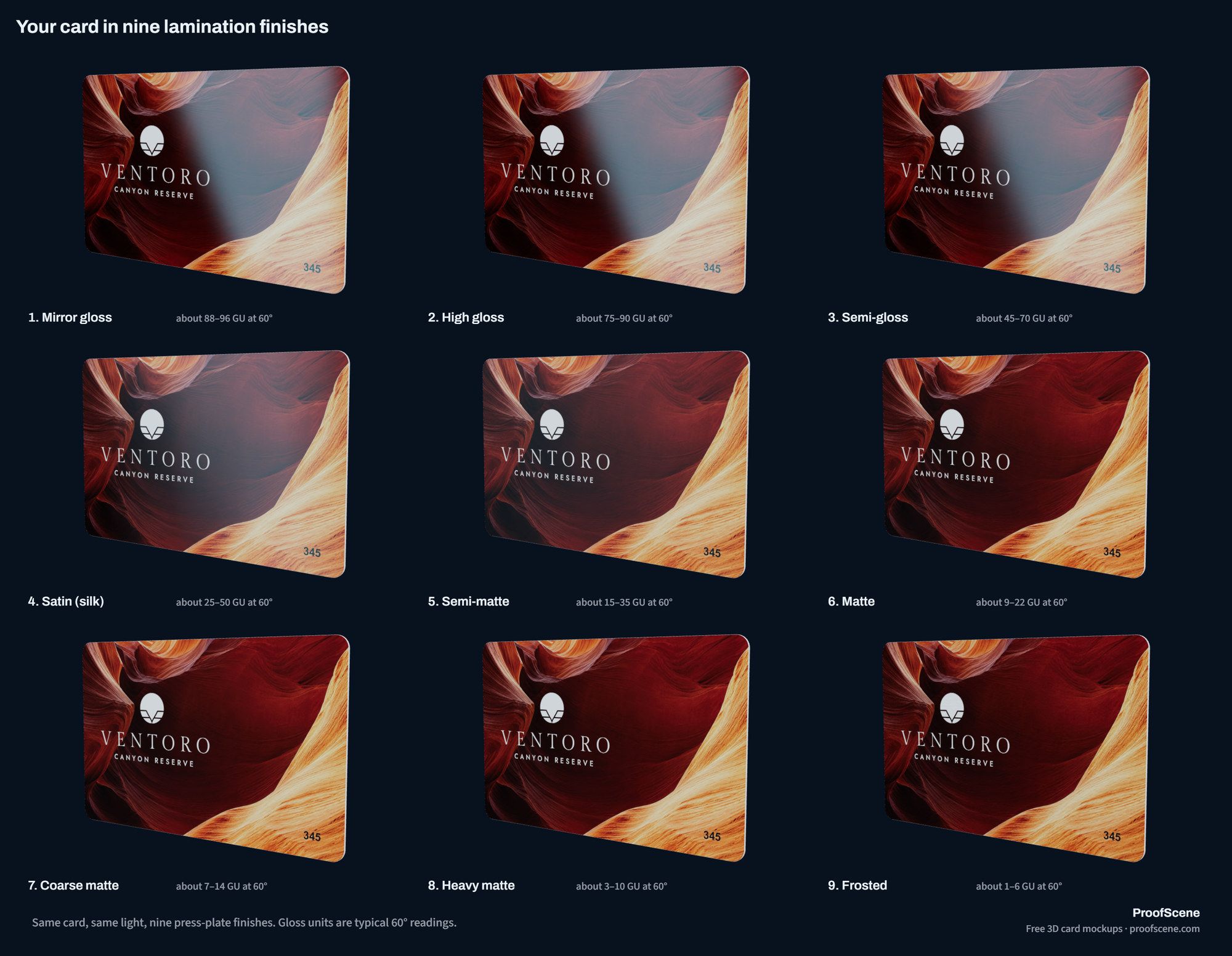
Card factories grade lamination plates by surface roughness, Ra, in micrometers: the smoother the plate, the glossier the card. A gloss meter reads the finished card in gloss units (GU) at 60°, around 90 GU for mirror gloss and under 10 for heavy matte. The slider in the tool follows that ladder, and each step is rendered by the same engine that builds ProofScene 3D proofs.
| Finish | Plate Ra (µm) | Gloss (GU at 60°) | What you see |
|---|---|---|---|
| Mirror gloss | 0.01–0.04 | 88–96 | Glass-smooth and wet-looking, like a piano finish |
| High gloss | 0.05–0.08 | 75–90 | The classic shiny credit card |
| Semi-gloss | 0.09–0.14 | 45–70 | Still shiny, with softer reflections |
| Satin (silk) | 0.15–0.26 | 25–50 | A soft, silky sheen |
| Semi-matte | 0.27–0.45 | 15–35 | Low sheen, easy to read under any light |
| Matte | 0.46–0.70 | 9–22 | Velvety, no glare |
| Coarse matte | 0.70–0.95 | 7–14 | Flat and dry to the touch |
| Heavy matte | 1.0–1.5 | 3–10 | Chalky, the flattest matte |
| Frosted | 1.5–3.5 | 1–6 | A visible grain, like frosted glass |
Dark designs change the most. On gloss, black stays deep until a light reflects in it. On matte, the surface scatters a little light everywhere, so black reads as a soft charcoal. Light, colorful designs look brightest on gloss and calmest on satin.
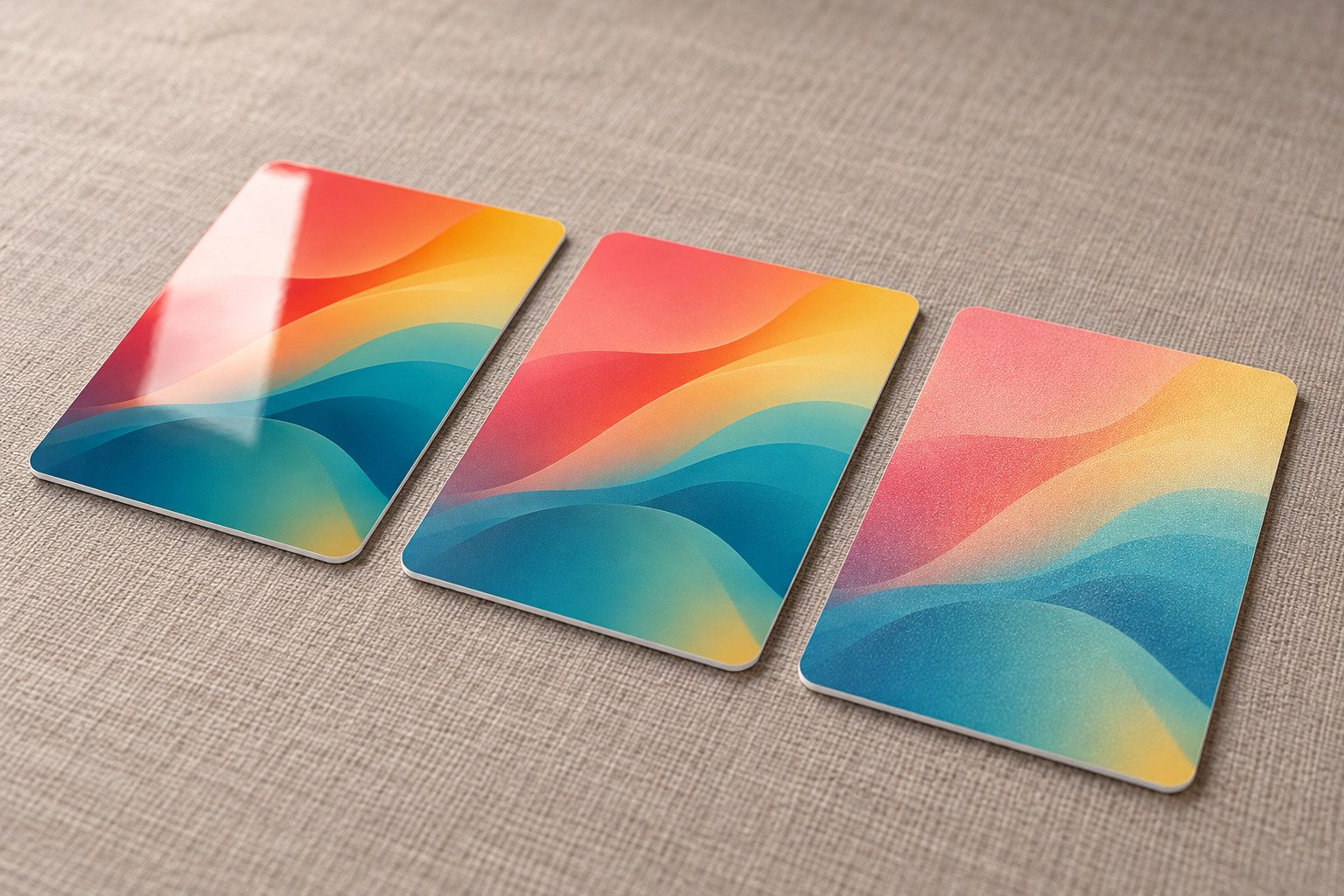
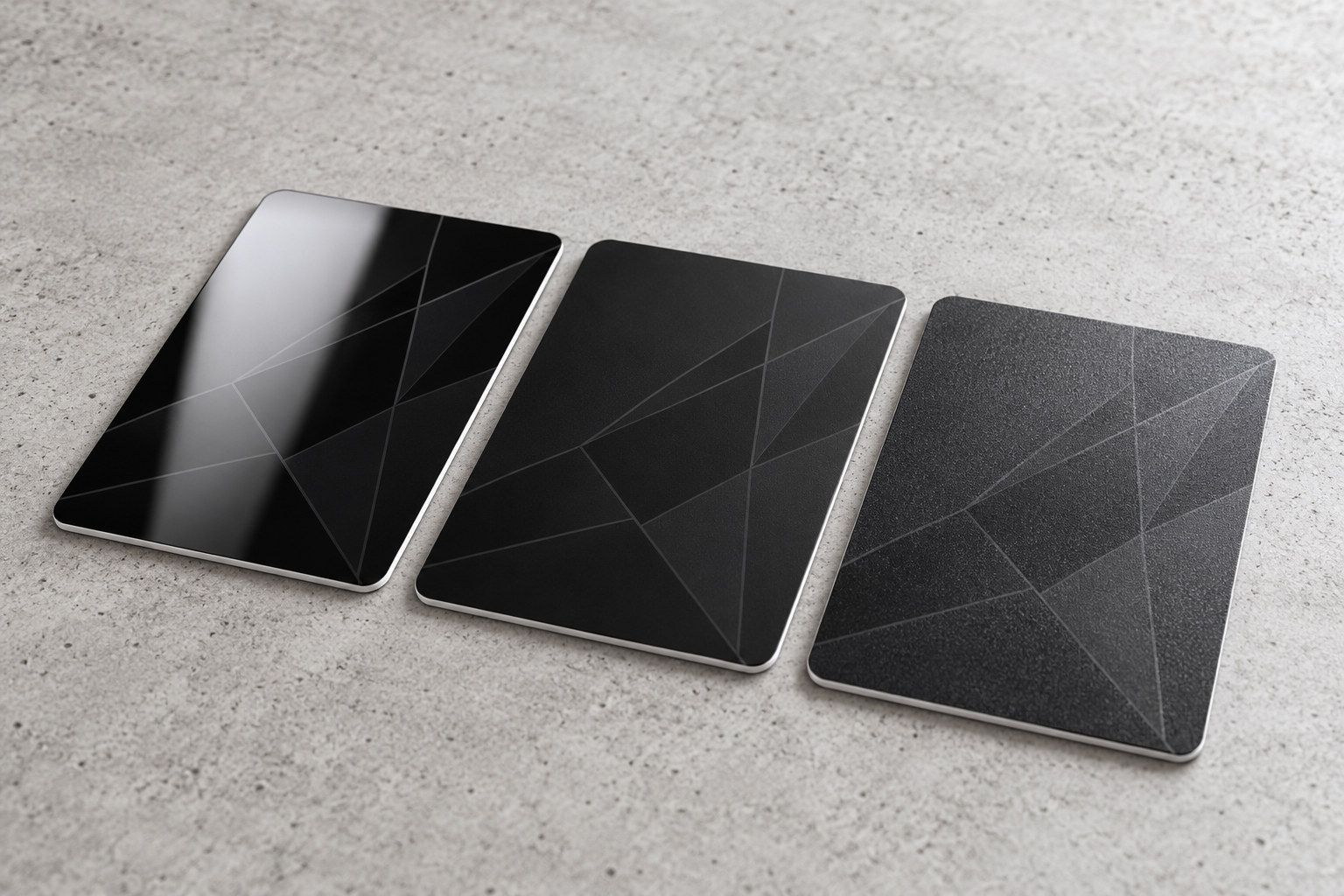
Which finish suits which card, and why gloss shows fingerprints: gloss vs matte vs frosted cards.
Click a color in your design and it becomes foil or raised gloss. Here is what each finish is, and what your printer needs from you.
Hot foil stamping presses a heated metal die through a film of metallized foil, which leaves a mirror layer wherever the die touches. The tool has ten foils: gold, silver, rose gold, copper, holographic, black, white, blue, red and green. In 3D the foil behaves as foil does: a mirror that flashes gold when it catches a light and turns dark between lights, with a bright rim where the die pressed it into the card.
Spot UV is a clear varnish printed only on chosen areas and hardened under ultraviolet light. On a matte card it is the glossy, slightly raised part that shines as the card tilts, the classic way to lift a logo off a dark card. On a laminated card both finishes go on top of the lamination, so move the finish slider and the foil and the varnish keep their own shine.
For print, a card printer asks for each effect as its own mask: solid black where the foil or varnish goes, on white, at the same size as the artwork, and many allow one foil color per card (4OVER4's plastic card spec is typical). The layered template download includes those plates for both sides. Most printers want the foil as a vector shape over artwork that continues underneath it, because foil is opaque and a knocked-out gap shows if the stamp lands a fraction off. Keep foil lines at least 0.3 mm wide (Topac's foil guidelines) and type at 8 pt or larger in a medium or bold weight (4OVER4); your printer's own specification wins.
Foil is a thin metal layer. On a contactless card, keep large foil areas off the antenna: does foil interfere with NFC and RFID cards?
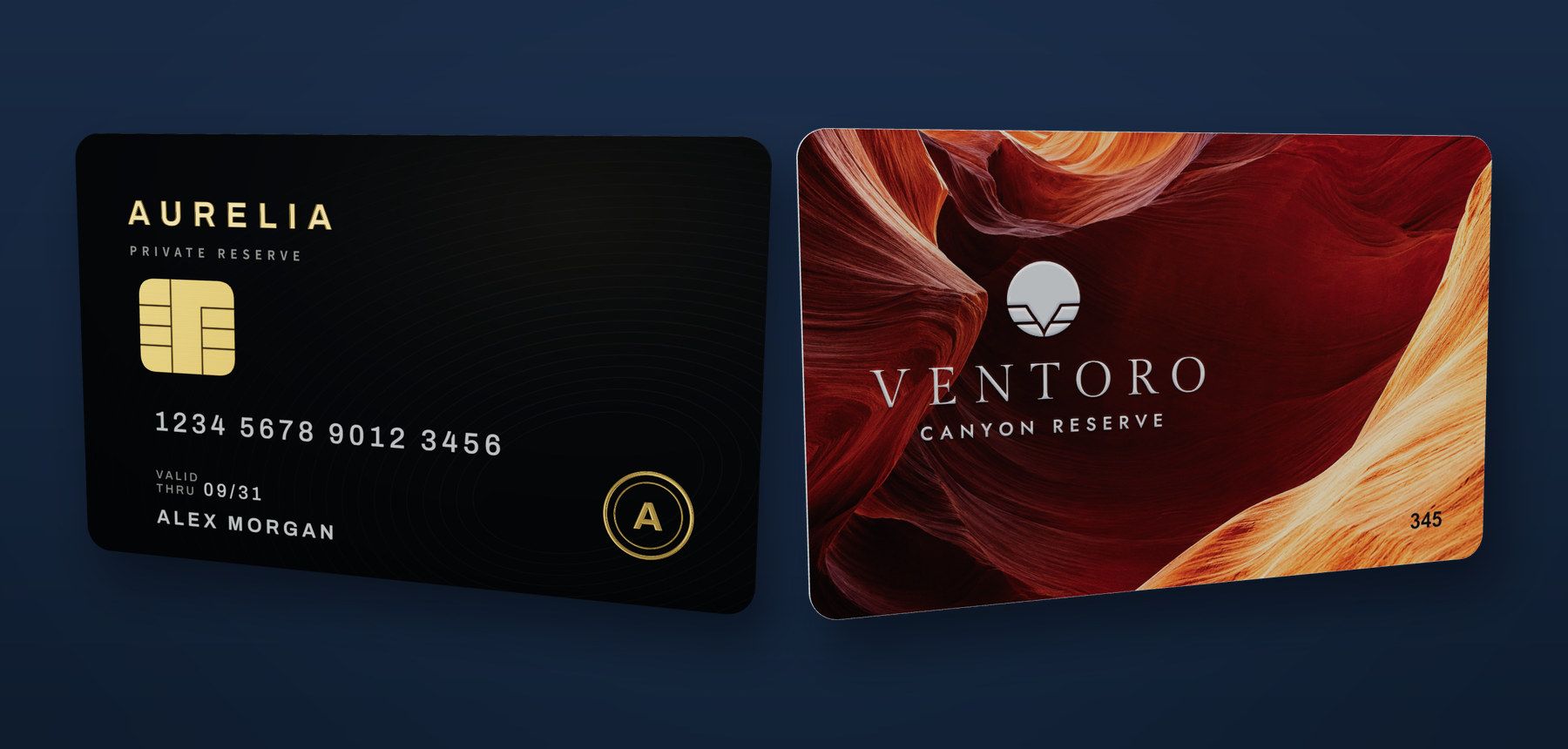
The chip and the stripe are drawn at their real size and their ISO position, so you see exactly what they cover.
An 8-pin contact plate is 13.0 × 11.8 mm and sits 8.56 mm from the left edge and 17.99 mm from the top of the front. A 6-pin plate is 11.0 × 8.3 mm at 9.56 mm and 18.47 mm, because it drops the bottom row of contacts. Both are centered on the contact zones that ISO/IEC 7816-2 defines.
The stripe runs edge to edge on the back. A 3-track stripe is 12.7 mm (½ in) wide and a 2-track stripe 8.4 mm. Card factories lay its top edge about 4.5 mm below the top of the card, inside the 5.54 mm limit of ISO/IEC 7811-2. Black is the usual high-coercivity (HiCo) stripe and brown the low-coercivity (LoCo) one.
Need the exact numbers for your designer, or a template with the chip and stripe as layers? Use the free CR80 card template and artwork checker, and read where the chip goes on a card and magnetic stripe dimensions.
Yes. The card is the ISO/IEC 7810 ID-1 format, the size of every credit card.
The card is 85.60 × 53.98 mm (3.370 × 2.125 in), 0.76 mm thick with 3.18 mm corners, the nominal values of ISO/IEC 7810. The card industry calls it CR80. True scale matters because small things are easy to get wrong on a screen: a 6 pt line of terms, a logo that slides under the chip, a name that ends 2 mm from a trimmed edge.
You can zoom in about ten times and the print stays sharp, which is the quickest way to judge whether small text will be legible on the real card. For the card in millimeters, inches and pixels at every dpi, see the CR80 card size guide.
Each answers a different question. Use the fastest one that answers yours.
| Method | Time | Shows the finish | True scale | Best for |
|---|---|---|---|---|
| This 3D mockup | Seconds | Yes: nine laminations, foil and spot UV | Yes, 85.60 × 53.98 mm | Choosing a finish, showing a client, web and app images |
| Flat PSD mockup | Minutes in Photoshop | Baked into the photo | Depends on the template | One fixed hero shot |
| Printed sample | Days to weeks | The real thing | Exact | Final sign-off on color and feel |
A mockup answers “does this design work on a card?” It shows placement, both sides, the edge, the chip and stripe, and how a finish behaves as the card turns. It does not prove printed color, because a screen is not a calibrated contract proof. It does not test a chip, a stripe or an antenna, and it does not measure a factory’s tolerances.
Keep the design safe to share, too. Use made-up numbers and names, and leave payment-network logos off unless you are the issuer: printers refuse artwork that looks like a real bank or ID card.
Teaching card design, or selling plastic cards? Send your readers and customers here. It stays free.
Copy the link below, or cite it as: ProofScene, “Free 3D credit card mockup generator”, proofscene.com, 2026.
<a href="https://proofscene.com/tools/3d-card-finish-visualizer/">Free 3D credit card mockup generator</a>Short answers about the free 3D card mockup generator: files, privacy, finishes and what a mockup can prove.
Ask us anythingYes. It is free with no sign-up and no usage limit. The transparent PNG has no watermark; the studio PNG and the sheets carry a small "Made with ProofScene" line in the corner. You may use the images commercially, for example on a website, in a pitch deck or in an app store listing.
Both. It reads JPG, PNG, WebP, AVIF, GIF, BMP, SVG and PDF, plus Illustrator files saved with PDF compatibility and Photoshop files saved with maximized compatibility. A print-ready PDF is placed by its trim box, so it lands on the card exactly, and a two-page PDF can use page 2 as the back.
No. Your design is read and rendered inside your browser and never leaves your device. The 3D engine, the PDF reader and every download run locally, so a confidential card design stays confidential.
Use at least 300 dpi at the finished size. A CR80 card is 85.60 × 53.98 mm, which is 1011 × 638 px at 300 dpi, or 1082 × 708 px with 3 mm bleed on every side. The placement dialog shows the effective dpi of your file as you resize it.
Yes. After the front, you can upload a back design, use page 2 of a PDF, choose a plain color or copy the front. The Front, Back, Angle and Edge buttons turn the card, and the front and back sheet puts both sides on one image.
Yes. Choose Add foil or Add spot UV and click a color in your design: every part in that color is picked, gradients included, or only the part you click. Paint more on with the brush, rub some out with the eraser, or upload the plate your designer made. There are ten foils, including gold, silver, rose gold, copper and holographic, and both finishes keep their shine on a matte or frosted card, as they do in print.
Choose gloss for the deepest colors and blacks, matte for a calm, glare-free card that takes a signature, and frosted for a grainy, tactile surface that hides fingerprints. Gloss shows fingerprints and fine scratches the most. The full comparison is in our gloss vs matte vs frosted guide.
No. A mockup shows appearance, placement and finish, but a screen is not a calibrated color proof and cannot test a chip or a stripe. For production sign-off, ProofScene turns a printer’s proof-sheet PDF into a 3D proof the customer reviews on a branded link.
Create a free account, upload a proof sheet and send your customer an interactive 3D proof on your own branded link today.
Free account · No credit card · Built by print people