How to put a 3D CAD model on your website: 4 ways compared
To put a 3D CAD model on your website, export the assembly as a STEP file, convert it into a lightweight display model in glTF or GLB format, and show that model in a web viewer on your product page. Your CAD file itself never has to be published: the browser downloads only the display model, which for Tutamen’s 42-part ICM-21 coolant manifold is a 2.0 MB download made from its STEP file.
STEP is the neutral 3D file every mainstream CAD system can export (ISO 10303). glTF is the open format for 3D on the web, from the Khronos Group, and GLB is glTF in a single file. The four ways from one to the other differ mainly in what your buyer can do, what you hand over and who keeps it working.
Why can’t a website show a STEP file directly?
A STEP file describes a product as exact mathematical surfaces, and a browser can only draw flat triangles. Every face has to be covered in small triangles first (the polygons people mean by a "mesh"), a step called tessellation. More triangles make curves smoother and the file bigger, so a good converter stops where curves look smooth at full screen.
The conversion also decides what the page can do. A good display model keeps every part separate, named and given a material, so the assembly can be exploded and each part clicked. It stores repeated parts once: the ICM-21’s file holds 214,168 triangles and the screen draws 654,948. It carries no feature tree, sketches or parameters, so figures such as mass and volume are measured from the exact CAD first, and a good page says the datasheet governs where the two differ.
What the chain produced for Proofscene’s four live models, measured from the files their pages load:
| Model | Parts | Triangles drawn | GLB file | Download |
|---|---|---|---|---|
| Tutamen ICM-21, liquid-cooling coolant manifold | 21 kinds, 42 pieces | 654,948 | 3.6 MB | 2.0 MB |
| STRAVIK SX 50-160*, end-suction centrifugal pump | 59 kinds, 115 pieces | 404,202 | 6.9 MB | 3.7 MB |
| HALVORN BV25*, two-piece full-bore ball valve | 14 | 271,900 | 5.3 MB | 2.4 MB |
| ARTIXO RA90*, strain-wave robot joint actuator | 32 kinds, 131 pieces | 455,821 | 7.2 MB | 3.5 MB |
Download is what a visitor waits for; the page and viewer around it add about half a megabyte. *STRAVIK, HALVORN and ARTIXO are fictional brands Proofscene modeled in-house to show other industries; the ICM-21 is Tutamen’s real product, built from its STEP file.
What are the four ways to put a CAD model on your website?
The four ways are a free online viewer’s embed, a hosted 3D platform or configurator, a page you build yourself on an open web component such as Google’s model-viewer, and an interactive product page built for you from the CAD. Here is how they compare on the questions that decide it for an industrial product:
| Free viewer embed | Hosted 3D platform | DIY with model-viewer | Built product page |
|---|---|---|---|
| What the buyer can do | |||
| Turn and zoom; some viewers add measuring or a section tool | Turn, zoom, labels, often AR on a phone; a configurator adds color and option picking | Turn, zoom, labels, AR, animations saved in the file; anything more is code you write | Explode it, cut it open, X-ray it, run the flow, click any part for its data, measure |
| What leaves your hands | |||
| Often the STEP file itself, on someone else’s servers | A display model, or CAD the platform converts for you, on its servers | Only the display model you make, on your own hosting | A display model to the browser; the STEP file only to the builder, under NDA if you ask |
| What the browser loads | |||
| The viewer’s own app and your model, framed from its site | The platform’s player and your model | The model-viewer script and your GLB file | The page, its viewer and a compressed model: 2.0 to 3.7 MB for the four live ones |
| Your effort | |||
| Low: upload, paste the embed code | Low to medium: upload, set views and labels | High: convert, simplify, light, code and test on phones | Low: send the CAD and datasheet, review a private link |
| When the product changes | |||
| Upload the new file | Upload the new model; the embed lasts while the subscription does | Convert, simplify and test again yourself | Rebuilt from the new CAD |
Which route fits your product?
A free viewer suits a quick look at one part for one customer. It is the fastest route and hands over the most, because a free CAD viewer works from your STEP file itself.
A hosted platform suits products sold by look and option, where a buyer picks a color or a size. That buyer picks them in a configurator.
Doing it yourself on model-viewer, Google’s free web component built on the three.js library, suits a web team with time and simple parts that only need turning. It handles turning, labels and AR well. The cost is converting, simplifying, lighting and testing every product, again at each change, and a section cut, an X-ray mode or a clickable parts list is code you write.
A built interactive product page suits engineered products whose value is inside the casing (pumps, valves, manifolds, robot joints) and buyers who check every number. Proofscene builds it into your own site, as one frame tag or as a hosted page at yourbrand.proofscene.com; Tutamen’s ICM-21 went live the day its STEP file arrived.
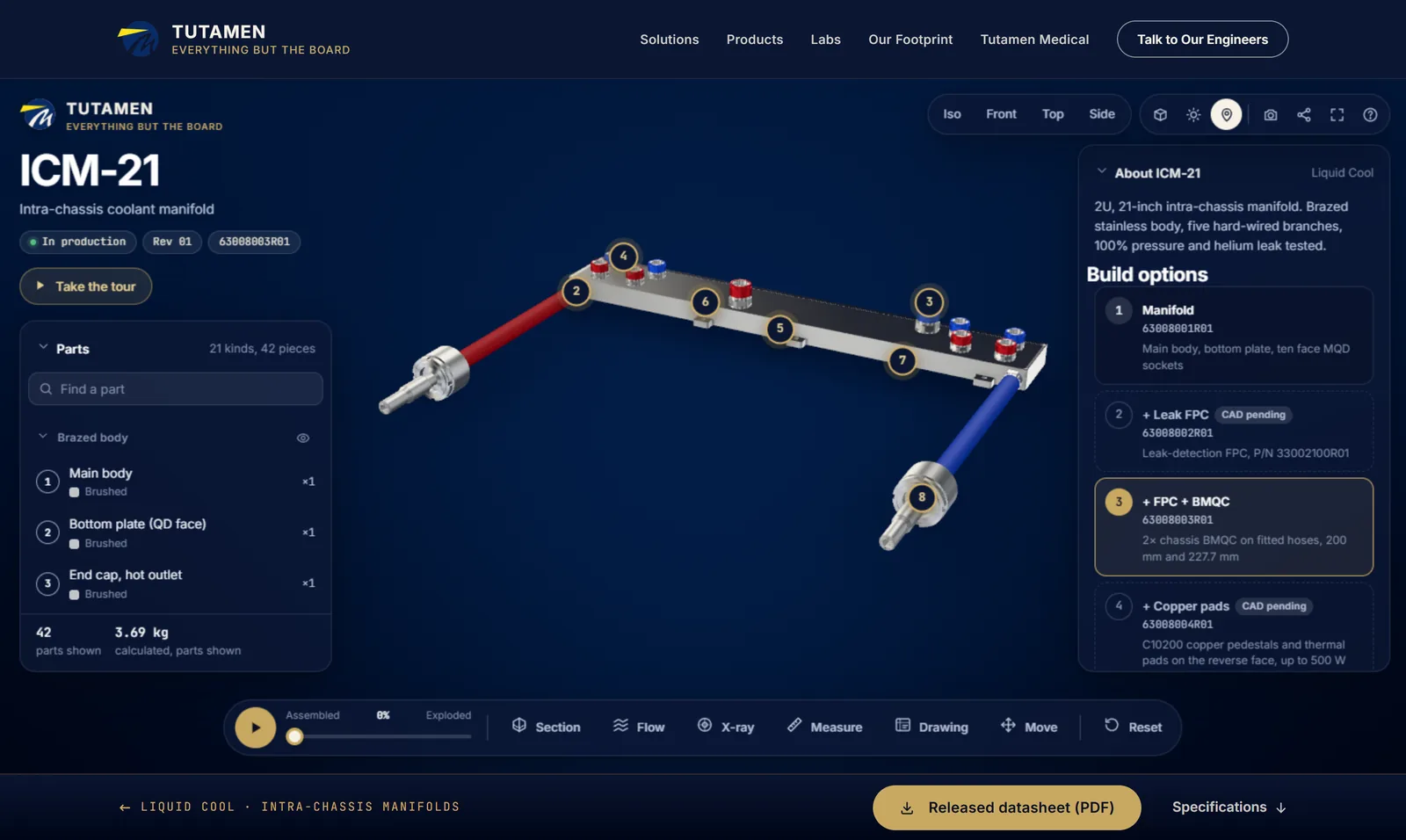
If your product belongs in that last group, send the STEP file and the datasheet and get your product in 3D. Built product pages come with Proofscene Business and Enterprise, and our team tells you what it will build and when it will be live before any work starts.
What should buyers be able to do with the model?
Buyers of engineered products want to see inside and check the numbers, so the model should let them take the product apart, cut it open, see through it and read each part’s data, not only turn it. Each of these runs in a live model you can open now:
- Exploded view. The HALVORN BV25 ball valve comes apart into its 14 parts in assembly order.
- Cutaway and flow. Slice the STRAVIK SX 50-160 pump in half and run it anywhere from 15 to 40 m³/h.
- X-ray. See the motor, the 50:1 strain-wave gear and the output bearing through the housing of the ARTIXO RA90 robot joint.
- Part data and measuring. Click any part of the Tutamen ICM-21 for its name, material and quantity, measure between real edges and run the coolant at the datasheet’s split.
- Sharing. A link and a QR code for every view, and a short guided tour for visitors who will not explore on their own.
Launch films can be rendered from the same model: see 3D product animation, or the 35-second film of an interactive 3D product page being taken apart in a browser.
How do you keep a 3D model fast on phones?
Keep the model to a few megabytes, load it when the visitor reaches it, and make sure the page reads well without it. A model that loads first holds up the text and pictures buyers came for.
- Compress the file. glTF can store numbers in fewer bytes and squeeze geometry with the Draco or meshopt extensions, and the server should send it compressed. Proofscene’s models keep surface directions in 16-bit numbers and travel gzipped: the ICM-21’s 3.6 MB GLB arrives as 2.0 MB.
- Spend triangles where buyers look. Thread detail, tiny fillets and the inside of parts nobody opens cost a phone time and add nothing.
- Show a still first. Load the 3D when it scrolls into view or on a tap; model-viewer does this with a poster image and lazy loading.
- Do not trap the scroll. Proofscene’s embeds scroll with the page and zoom only with Ctrl or a pinch, and on phones their panels fold into sheets so the product stays visible.
- Keep the facts in the text. Search engines and AI assistants read the page, not the model, so put the description, part names and specifications in the HTML. Proofscene’s public demo pages add structured data for the 3D model, and a browser that cannot run 3D still gets that text.
Is your CAD safe once the model is on a public page?
Yes, because a display model is not your CAD: it holds triangles at screen accuracy, with no feature tree, sketches, parameters or exact surfaces, and none of the internal detail you left out. Protect what matters before publishing:
- Simplify or remove anything commercially sensitive, such as an internal channel or a seal profile.
- Never upload the STEP file to a viewer whose visitors can download the original.
- Review on a password-protected link before launch, and sign an NDA with whoever handles the CAD. Proofscene works this way, and you keep ownership of your CAD and your content.
Related reading
Read how Tutamen’s ICM-21 went from STEP file to a live product page, try all four models on the interactive 3D product demo page, or watch the 36-second film of a 3D product viewer going onto your website.
Putting CAD on your website, answered
Short answers to what marketing and product teams ask before a CAD model goes on a product page.
Get your product in 3DCan I upload a STEP file straight to my website?
Not so that visitors see it in 3D. Browsers draw triangles, so the STEP file first has to become a display model, usually a GLB file. Offering the STEP file as a download hands every visitor your full CAD.
What file format should a 3D model on a website be?
GLB, the one-file form of glTF: three.js, Google’s model-viewer and most web viewers read it, and it compresses with Draco or meshopt. AR on an iPhone also needs a USDZ copy, which model-viewer can generate when the AR button is pressed.
How big should a 3D model be for a website?
A few megabytes is a sensible ceiling for a product page that has to work on phones. Proofscene’s four live models download at 2.0 to 3.7 MB each, plus about half a megabyte for the page and its viewer.
Will a 3D model slow down my product page?
Not if the page shows a still image first, loads the model on scroll or tap, and keeps the specifications in its text.
Does this work in WordPress, Webflow or Shopify?
Yes. Every route ends in a frame or a script tag, which any site builder that accepts custom HTML can hold. Proofscene can also build the whole page in WordPress, Webflow, Shopify, HubSpot, React or plain HTML.