Interactive 3D product demos, built from your CAD
Proofscene builds interactive 3D product demos from your CAD and datasheet. Your buyers take the product apart, cut it open and watch it work, in any browser, on your own website, as Tutamen’s buyers do on tutamen.com.
01/04End-suction centrifugal pump
STRAVIK SX 50-160Cut the pump open and turn the water on
STRAVIK is a fictional brand: this is a Proofscene demo product modelled in-house.

What is an interactive 3D product demo?
An interactive 3D product demo is a web page where a buyer can turn a manufacturer’s product, explode it, slice it open and watch it run, built from the manufacturer’s own CAD. It answers the questions engineers ask before they call a supplier: what is inside, how it goes together, how it works and whether it fits. Proofscene’s demos run in the browser on WebGL (three.js) from a compressed display model of a few megabytes: the 42-part ICM-21 is about 2 MB.
- Built from
- Your STEP file and datasheet
- Runs in
- Any browser, laptop or phone, no app
- Lives on
- Your own product page
02/04Liquid-cooling coolant manifold
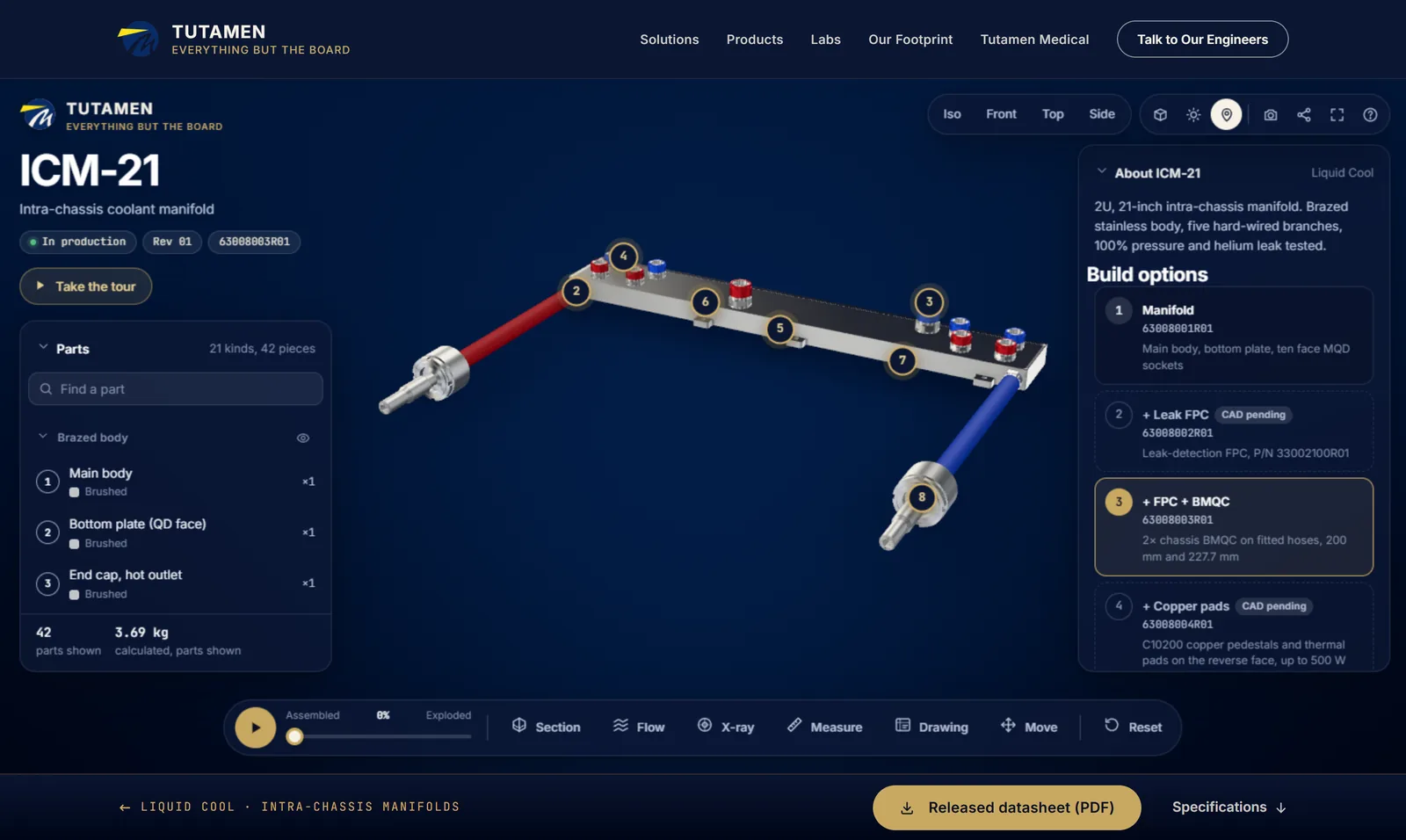
Tutamen ICM-21
A real manufacturer’s product page, live on their site
Turn the coolant on: it runs the datasheet’s split, about 40% to the ASIC and VRM and 15% to each OSFP branch. Drag the flow rate and every branch updates.
- Coolant flow
- Exploded view
- Toleranced drawing
- Measuring
- Part data
- Parts
- 21 kinds, 42 pieces
- Inlet flow
- 3–10 LPM
- Mass from CAD
- 3.69 kg
Built for a customer from their STEP file. See it on tutamen.com

03/04Two-piece full-bore ball valve
HALVORN BV25
Take a valve apart, part by part
Explode it into its 14 parts, from the lever and gland nut down to the blow-out-proof stem, the full-bore ball and both seat rings. Click any part for its material and mass.
- Exploded view
- Cutaway
- X-ray
- Part data
- Measuring
- Parts
- 14
- Size
- DN25, G1 female
- Rating
- PN63 / 1000 WOG
HALVORN is a fictional brand: this is a Proofscene demo product modelled in-house.

04/04Strain-wave robot joint actuator
ARTIXO RA90
See inside a sealed robot joint
Explode the joint or X-ray it with one part kept solid: the encoder, frameless motor, 50:1 strain-wave gear and 48-roller output bearing are all inside one housing.
- Exploded view
- X-ray
- Cutaway
- Part data
- Guided tour
- Parts
- 32 kinds, 131 pieces
- Gear
- 50:1 strain wave
- Torque
- 34 N·m rated, 70 peak
ARTIXO is a fictional brand: this is a Proofscene demo product modelled in-house.

What your buyers can do in it
Every tool works with every other: cut the pump open with the flow running, X-ray it while it is exploded, measure a part you have moved. Each comes from something you already have.
| Tool | What the buyer does | Made from |
|---|---|---|
| Exploded view | The assembly comes apart in order, with a slider to stop at any point. Sockets unscrew, fasteners back out, parts can be moved by hand. | Your CAD assembly |
| Cutaway section | Slice the product on any of three axes, at any depth, either way round. Cut faces are hatched like a drawing. | Your CAD solids |
| Flow | Fluid runs the real channels, split the way your datasheet says, with a flow-rate slider. Impellers and rotors turn with it. | Your datasheet |
| X-ray | The housing turns to glass so the inside shows, with any one part kept solid to follow it through the assembly. | Your CAD |
| Measuring | Point-to-point measurements that snap to the model’s real edges and faces, in millimeters. | Your CAD geometry |
| Drawing view | A drawing-style view with the dimensions and tolerances you publish, so an engineer can check fit without asking for a PDF. | Your drawings |
| Parts and part data | A searchable parts list. Click any part for its material, mass, volume and area, each marked as from the CAD or the datasheet. | CAD and datasheet |
| Guided tour | A short tour of the three or four things that sell the product, with callouts, for visitors who will not explore on their own. | Your sales story |
| Share link and QR code | Every view has a link and a QR code: for a sales email, a quote, a datasheet or a trade-show stand. | Built in |
| Phones and tablets | Runs in the browser on a laptop or a phone, with a layout of its own for small screens. No app, no plug-in, no login. | Built in |
On your website, in your stack
The demo belongs on the page where buyers already look for the product. We put it there, in whichever of three ways suits your site.
Built into your own site
We build the product page in the stack your site already runs (WordPress, Webflow, Shopify, HubSpot, React or plain HTML), with your header, fonts, specs table, datasheet button and contact form. It lives at your address and you own the page.
Embedded in an existing page
One frame tag puts the model into a page you already have. The viewer scrolls with the page and zooms only with Ctrl or a pinch, so it never traps a visitor.
Hosted for you
A page of its own at yourbrand.proofscene.com/product, with your logo and colors, a share link and a QR code, ready for sales emails and stands.
<iframe src="https://yourbrand.proofscene.com/your-product"
  title="Your product in 3D" allow="fullscreen"
  style="width:100%;aspect-ratio:16/9;border:0"></iframe>
Weighing a free viewer, a hosted 3D platform or building it yourself? How to put a 3D CAD model on your website compares all four routes, with the file sizes of the demos on this page.
From CAD file to live page
Five steps, most of them ours. Your part is the files at the start and one review before it goes live.
- 1
Send the CAD and the datasheet
A STEP file (or any CAD export), the datasheet PDF, two or three product photos and what you want shown: flow, a cutaway, the assembly, a feature.
- 2
Choose your plan
3D Hardware comes with Proofscene Business and Enterprise. We look at the model and the story and tell you what we will build and when it will be live.
- 3
We build the demo
Part names, materials, the explode order and the flow routes from your datasheet; a guided tour of your strongest selling points.
- 4
Review a private link
You and your engineers check every number on a private link, password-protected if the product is not public yet.
- 5
Go live
On your own site, in an existing page or on a hosted page, with its share link and QR code. Launch films with voiceover from the same model are made to order.
Launch films from the same model
The model that runs on your page also makes your launch films: the assembly opening, the coolant running, the cut sliding through, each cut natively for LinkedIn, YouTube, Instagram, TikTok and X with captions, thumbnails and post copy. These six went out for the ICM-21 and the demo products.
See the films and what you get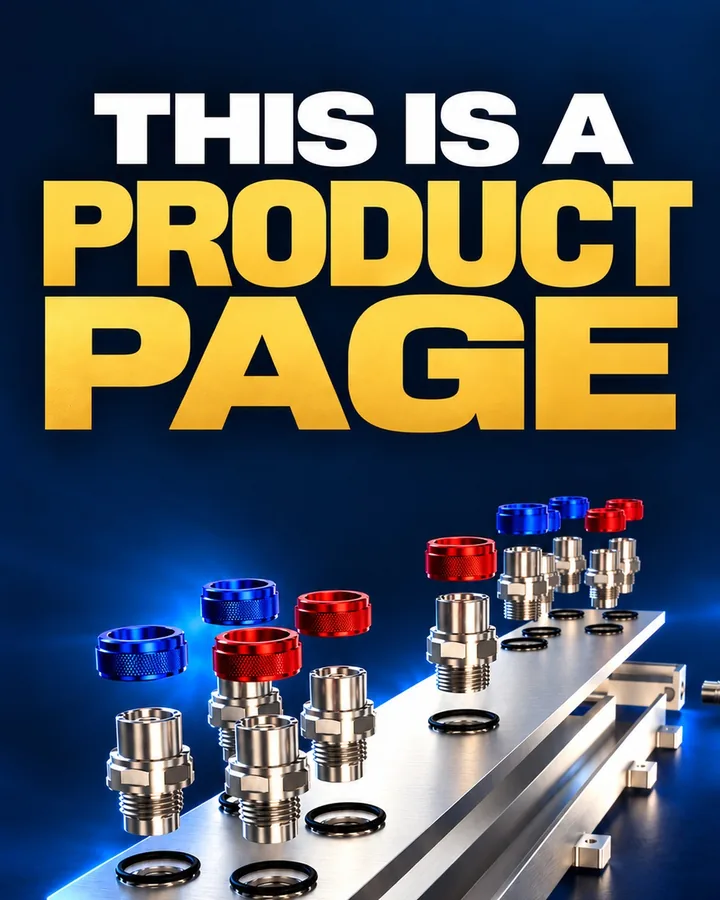


Interactive 3D demo, video, cutaway or datasheet?
They do different jobs, and a demo works best beside the datasheet. What each one does for a buyer:
| Question | Interactive 3D demo | Product video | Physical cutaway | PDF datasheet |
|---|---|---|---|---|
| The buyer chooses what to look at | Yes | No, the edit does | Yes, in the room | No |
| Shows the inside and how it works | Yes: cutaway, X-ray, flow | Yes, as filmed | Yes, for one cut | Section drawings only |
| Measurable | Yes, snapped to the CAD | No | With calipers | Published dimensions |
| Reaches a buyer | A link, on any phone | A link | Shipped or carried to a meeting | A download |
| When the product changes | Rebuilt from the new CAD | Re-rendered and re-edited | Made again | Reissued |
| Works on your product page | Yes, inside it | Yes, as a player | No | As a download |
Who it is for
Makers of engineered products whose difference is inside the casing, and whose buyers are engineers who check every number.
Pumps, valves and fluid handling
Cut it open and run the flow, so a buyer sees the hydraulic path a brochure can only describe.
Liquid cooling and thermal hardware
Coolant routes, splits and fittings, checked against the datasheet by an engineer before they call.
Robotics, motion and drives
Gear trains, bearings and encoders exploded out of a sealed housing.
Connectors, sensors and enclosures
X-ray the internals and measure the mounting points without a sample on the desk.
Medical and lab devices
Show how a device works and goes together, for training and sales, without shipping a unit.
Trade-show exhibitors
The same model on a stand screen and on every visitor’s phone through a QR code.
Your CAD stays yours
- The browser receives a lightweight display model, never your STEP file or feature tree.
- Internal details you do not want public are simplified or left out of the display model.
- Review links can be password-protected until launch, and we sign an NDA on request.
- You keep ownership of your CAD, your data and your content.
Get your product in 3D
Tell us what the product is and what buyers need to see. We reply with what we would build and when it will be live, and send a secure upload link for the CAD.
- A STEP file or any CAD export
- The datasheet PDF
- Your website address
Prefer email? hello@proofscene.com
Thanks, it is with us. We usually reply within one business day, with an upload link for your CAD.
Interactive 3D product demo FAQ
Straight answers about building an interactive 3D product demo from your CAD: files, cost, time, delivery and confidentiality.
Ask about your productWhat is an interactive 3D product demo?
It is a web page where a buyer can turn your product, take it apart, cut it open and see it work, built from your own CAD model and running in any browser. Unlike a video, the visitor chooses what to look at; unlike a downloaded CAD file, it needs no software and shows only what you choose to publish.
Can you build one from a STEP file?
Yes. STEP is the usual starting point, and exports from SolidWorks, Inventor, Creo, NX, Fusion and other CAD tools work too. Tutamen’s ICM-21 manifold went from its STEP file to a live 3D product page the day the file arrived.
Does it work on phones, and does the visitor need an app?
It runs in the browser on laptops, tablets and phones, with a layout of its own for small screens. There is no app, plug-in or login. A browser that cannot run 3D at all gets the product’s description, parts and specifications as a normal page.
How does it get onto our website?
Three ways: we build the product page into your own site in the stack it already runs, we give you one frame tag for an existing page, or we host it for you at yourbrand.proofscene.com. A hosted link can go out in sales emails first and onto your site later.
Is it a 3D configurator?
No. A configurator lets a shopper pick colors and options before buying. An interactive 3D demo explains an engineered product: how it goes together, what is inside and how it works. If your product has build options, the demo can switch between them, as the ICM-21 page does.
Can it show internal parts and moving fluid?
Yes. The cutaway slices the model on three axes, X-ray shows the inside with any part kept solid, and flow runs fluid through the real channels, split the way your datasheet says, with impellers and rotors turning.
How much does an interactive 3D product demo cost?
Interactive 3D product demos come with Proofscene Business, at $299 a month or $2,990 a year, and with Enterprise (from $1,199 a month, billed yearly) for whole ranges and several brands. Our team builds each product's demo from your CAD as part of the plan, and launch films with voiceover are priced on the custom films page. See every plan on the pricing page. For comparison, a 2019 Sketchfab guide puts the average upfront cost of an end-to-end 3D configurator project at $15,000 to $50,000.
How long does it take?
It depends on the model and on how quickly your engineers review the private link. Tutamen’s ICM-21, 42 parts with coolant flow and a toleranced drawing view, was live at tutamen.proofscene.com the day its STEP file arrived. Larger assemblies take longer, and our team gives you a date.
Is our CAD safe?
The browser receives a lightweight display model, never your STEP file or feature tree. Internal details you do not want public can be simplified or left out, review links can be password-protected, and we sign an NDA on request. You keep ownership of your CAD and your content.
Can we use it at trade shows?
Yes. The demo runs full screen on a stand display, and its QR code puts the same model on each visitor’s phone so they can take it home.
Can we get marketing videos from the same model?
Yes. Because the model already exists, launch films and short clips for LinkedIn, YouTube, Instagram, TikTok and X are made from the same scene, in 16:9, 4:5 and 9:16, with captions, thumbnails and post copy. See 3D product animation.
Can Google and AI assistants read the 3D demo?
Yes, when the demo is public. Each demo page carries the product’s description, its parts by name and its specifications as ordinary text, with structured data for the 3D model, so search engines and AI assistants can read what the model shows without running it. Demos for private sales conversations stay out of search and behind a password instead.
Are the pump, valve and robot joint real products?
No. STRAVIK, HALVORN and ARTIXO are fictional brands Proofscene modelled to show different industries. The Tutamen ICM-21 is a real product, built for Tutamen from their STEP file and live on tutamen.com.